Work Order Management Secrets That Boost Success Fast
Introduction
If you have ever struggled with missed tasks, delayed maintenance, or unclear job assignments, you are not alone. Many businesses face these issues daily. This is where work order management becomes essential. It helps you organize, track, and complete tasks in a structured way.
In simple terms, work order management is the process of handling requests for work from start to finish. It covers creating tasks, assigning them, tracking progress, and closing them once completed. When done right, it keeps everything running smoothly.
In this guide, you will learn what work order management really means, why it matters, and how you can improve it. We will explore tools, best practices, and common mistakes. By the end, you will have a clear roadmap to manage work orders efficiently and reduce stress in your daily operations.
What Is Work Order Management
Work order management is a system used to manage tasks or jobs within an organization. These tasks can include maintenance, repairs, inspections, or service requests.
A work order usually includes key details such as:
- Task description
- Assigned person or team
- Deadline
- Required materials
- Status updates
When you manage these properly, you reduce confusion and improve productivity.
Think of it like a to do list, but much more detailed and structured. Instead of guessing what needs to be done, you have a clear plan.
Why Work Order Management Matters
Without a proper system, tasks can easily fall through the cracks. This leads to delays, unhappy customers, and wasted resources.
Here is why work order management is important:
Improved Efficiency
When tasks are clearly assigned, your team knows exactly what to do. This reduces downtime and confusion.
Better Communication
Everyone involved can see updates in real time. This keeps teams aligned and avoids repeated questions.
Cost Control
Tracking materials and labor helps you control expenses. You avoid overspending and identify waste.
Higher Customer Satisfaction
When jobs are completed on time, customers are happier. This builds trust and long term relationships.
Key Components of Work Order Management
To understand work order management, you need to break it into its core parts.
Work Order Creation
Every process starts with creating a work order. This includes all necessary details about the task.
A good work order should be clear and complete. Missing information can cause delays.
Assignment and Scheduling
Once created, the work order is assigned to the right person. Scheduling ensures tasks are completed on time.
Tracking Progress
Tracking allows you to see how work is progressing. You can identify delays early and take action.
Completion and Review
After the task is done, the work order is closed. Reviewing the process helps improve future performance.
Types of Work Orders
Not all work orders are the same. Understanding the types helps you manage them better.
Corrective Work Orders
These are created when something breaks. The goal is to fix the issue quickly.
Preventive Work Orders
These are planned in advance. They help prevent problems before they happen.
Inspection Work Orders
These involve checking equipment or systems. They ensure everything is working properly.
Emergency Work Orders
These require immediate action. They are usually high priority and cannot wait.
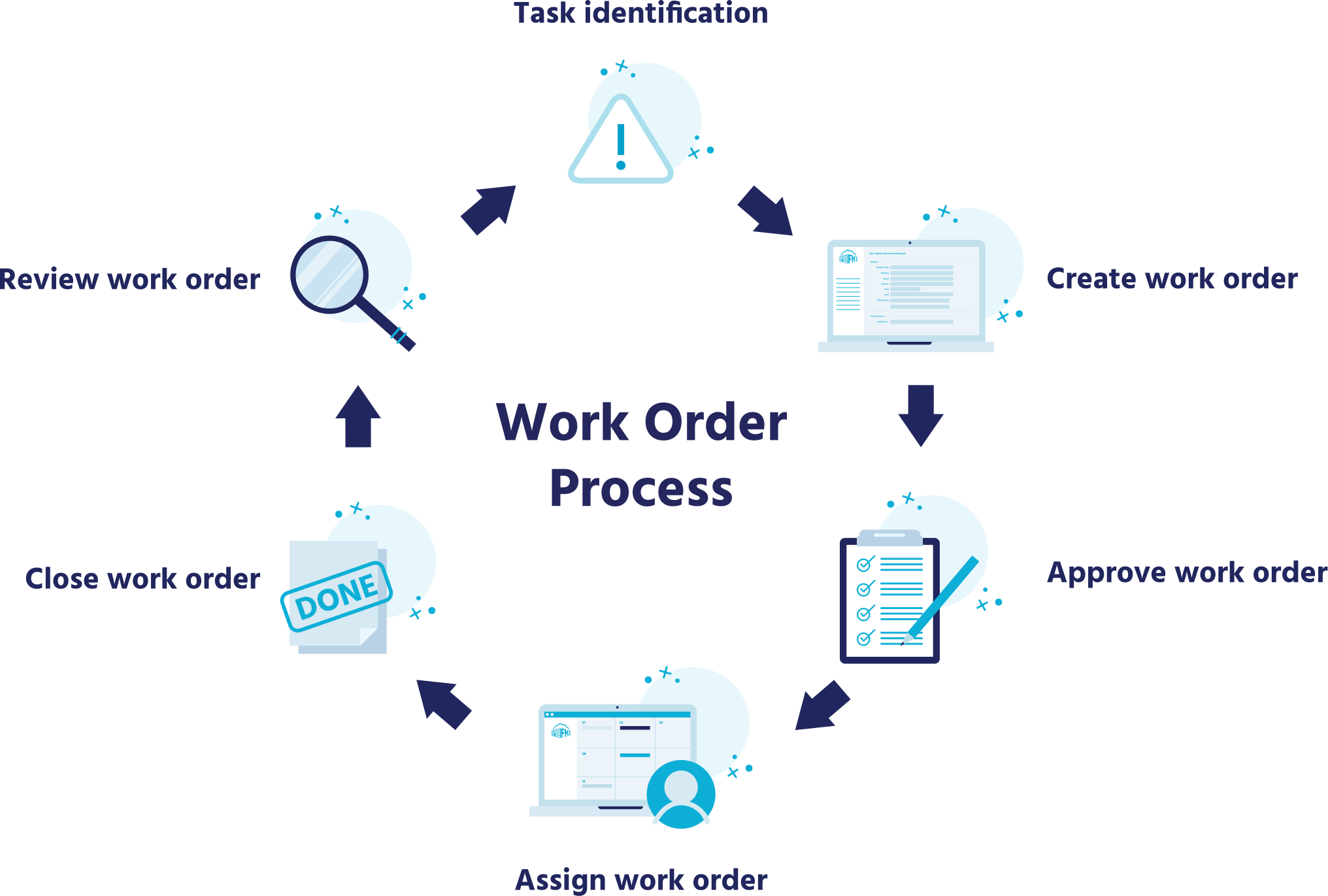
Work Order Management Process Step by Step
Let us walk through a simple process of work order management.
Step 1: Request Submission
A request is made for a task. This can come from a customer or employee.
Step 2: Work Order Creation
The request is turned into a formal work order with all details included.
Step 3: Approval
Some tasks require approval before work begins. This ensures proper control.
Step 4: Assignment
The task is assigned to the right team or individual.
Step 5: Execution
The work is carried out according to the plan.
Step 6: Monitoring
Progress is tracked to ensure everything stays on schedule.
Step 7: Completion
The task is finished and marked as complete.
Step 8: Review and Reporting
Performance is reviewed to identify improvements.
Benefits of Using Work Order Management Software
Many businesses now use software for work order management. It makes the process faster and more accurate.
Real Time Updates
You can track tasks instantly. This improves decision making.
Automation
Routine tasks can be automated. This saves time and reduces errors.
Centralized Data
All information is stored in one place. This makes it easy to access and manage.
Mobile Access
Many tools allow you to manage work orders from your phone. This is useful for field teams.
Common Challenges in Work Order Management
Even with a system in place, challenges can arise.
Poor Communication
If updates are not shared, confusion can occur.
Incomplete Work Orders
Missing details can delay tasks and cause mistakes.
Lack of Prioritization
Not all tasks are equally important. Without priorities, urgent jobs may be delayed.
Manual Processes
Using paper or spreadsheets can slow things down. Errors are more likely.
Best Practices for Effective Work Order Management
Improving work order management does not have to be complicated. Small changes can make a big difference.
Standardize Your Process
Create a consistent format for all work orders. This makes them easier to understand.
Use Clear Descriptions
Avoid vague instructions. Be specific about what needs to be done.
Set Priorities
Label tasks based on urgency. This helps your team focus on what matters most.
Train Your Team
Make sure everyone understands the system. Training improves efficiency.
Monitor Performance
Track key metrics such as completion time and backlog. This helps you identify areas for improvement.
Key Features to Look for in Work Order Management Tools
If you are choosing software, focus on features that support work order management.
- Easy work order creation
- Task assignment and scheduling
- Real time tracking
- Reporting and analytics
- Mobile accessibility
These features ensure you get the most value from your system.
Work Order Management in Different Industries
Work order management is used across many industries. Each has its own needs.
Manufacturing
It helps track machine maintenance and reduce downtime.
Facilities Management
It ensures buildings are maintained properly.
Healthcare
It supports equipment maintenance and patient safety.
IT Services
It helps manage support tickets and technical issues.
Real Life Example of Work Order Management
Imagine you run a small maintenance company. A customer reports a broken air conditioner.
Here is how work order management works in this case:
- The request is logged into the system
- A work order is created with details
- A technician is assigned
- The technician receives the task on their phone
- The repair is completed
- The work order is closed and recorded
This simple process ensures nothing is missed.
I have seen businesses improve response times just by organizing their work orders better. Even small changes can have a big impact.
Metrics to Track in Work Order Management
Tracking performance helps you improve over time.
Important metrics include:
- Average completion time
- Number of open work orders
- First time fix rate
- Labor and material costs
These metrics give you a clear picture of how well your work order management system is working.
Tips to Improve Work Order Management Today
If you want quick improvements, start with these tips:
- Use digital tools instead of paper
- Keep work orders simple and clear
- Review completed tasks regularly
- Communicate updates with your team
- Focus on preventive maintenance
These steps can make your work order management process more efficient right away.
Future Trends in Work Order Management
Technology is changing how businesses handle tasks.
Automation and AI
Systems can now predict issues and create work orders automatically.
IoT Integration
Devices can send alerts when maintenance is needed.
Cloud Based Systems
Cloud tools make it easy to access data from anywhere.
These trends are making work order management faster and smarter.
Conclusion
Work order management is more than just tracking tasks. It is a system that keeps your operations organized and efficient. When you manage work orders properly, you save time, reduce costs, and improve customer satisfaction.
By understanding the process, using the right tools, and following best practices, you can take control of your workflow. Even small improvements can lead to big results over time.
Now think about your current system. Are your work orders clear and well managed, or is there room for improvement? Taking action today can make your operations smoother tomorrow.
FAQs
What is work order management in simple terms
It is the process of creating, assigning, tracking, and completing tasks in an organized way.
Why is work order management important
It improves efficiency, reduces delays, and helps teams stay organized.
What industries use work order management
It is used in manufacturing, healthcare, IT, facilities management, and many others.
What is a work order example
A maintenance request to repair a machine is a common example of a work order.
Can small businesses use work order management
Yes, even small businesses benefit from organizing tasks and tracking progress.
What tools are used for work order management
Many businesses use software with features like tracking, scheduling, and reporting.
How can I improve work order management
Use clear instructions, prioritize tasks, and adopt digital tools.
What is the difference between preventive and corrective work orders
Preventive work orders are planned to avoid issues, while corrective ones fix existing problems.